 Machine Learning for All
Your data.
New possibilities.
Prepare, predict, and optimize with machine learning. Understand the results, without writing code.
From spreadsheet to explained prediction in six steps
Upload
Drag and drop CSV, XLSX, or XLS data, or choose one of five practice datasets. Column types are detected automatically.
Prepare
Set data types, clean your data, and create labels and encodings without writing code.
Train
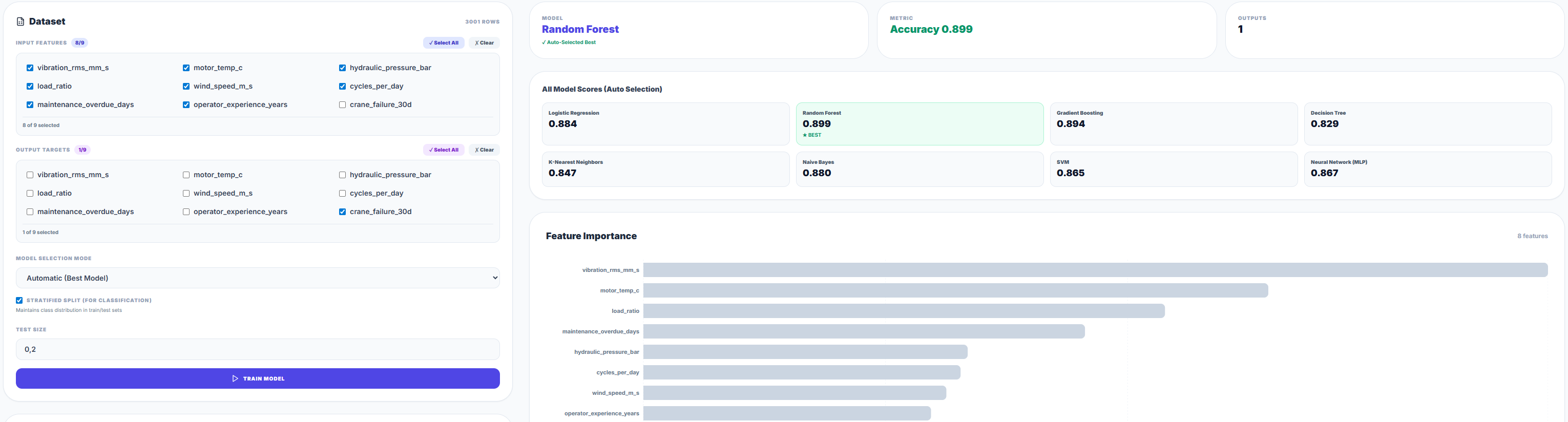
Select a model type, or let the app compare all applicable models and keep the best. See test metrics and feature importance.
Predict
Enter one value per input for an individual case. Get the predicted outcome, with the class and its probability for classification.
Optimize
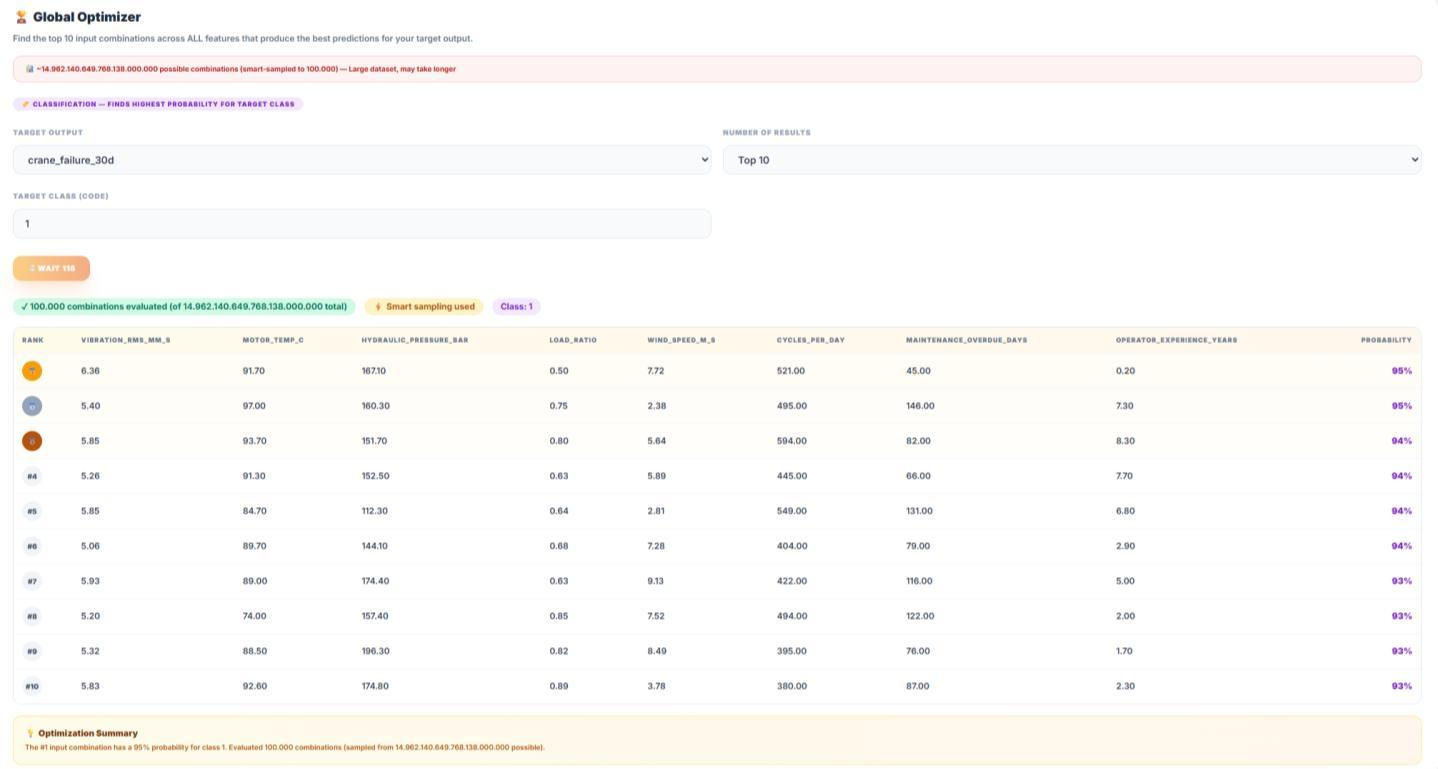
Search for input combinations that improve the predicted outcome, using the Prediction Optimizer or Global Optimizer.
Explain
Ask AI to describe a trained model, its performance, drivers, and recommendations in plain language. Save or download the report.
Turn raw spreadsheets into models you can inspect
Understand the spreadsheet
Inspect mean, median, range, quartiles, skewness, and missing values per column. Integer, decimal, text, and boolean types are explained with examples.
Clean and reset
Remove duplicates, standardize text, and fill or drop missing values in one click. Review a summary of changes or reset to the original upload.
Create labels and encodings
Get encoding suggestions per column. Build rule-based labels using greater than, equals, or contains, or use quartiles, percentiles, bins, K-means clusters, label encoding, and one-hot encoding.
Compare nine model families
Choose from families including linear and logistic regression, random forest, boosting, and neural networks. Automatic best-model selection tries every applicable type and displays each score.
The model predicts. You decide.
Review test metrics, the scores of the algorithms tried, and feature importance alongside accuracy or R-squared. Use that evidence to judge the model before acting on its predictions.
Predict one case, then search for better inputs
Prediction Optimizer
Fix one input and search the remaining inputs for the best three combinations. Compare the predicted outcomes before choosing your next step.
Global Optimizer
Search across every input for up to 50 top combinations. Rank by class probability, maximize a predicted value, or aim for a target value. When exhaustive testing is too large, the app samples and tells you.
Explain the model to the people who need to act
Choose a trained model and generate a report that explains performance, drivers, and recommendations in non-technical language. Keep the insights with your team and download them as an HTML or text report.
Managed AI
The model and key are managed on the server, with a monthly token cap per user. Nothing to configure.
Bring your own key
Use OpenAI, Claude, or Gemini. Your key is sent with each request and is never stored on the server.
Local models
Use Ollama or LM Studio on your own computer, called directly from your browser for explanations.
These AI options power model explanations. Local inference is an option within the hosted application, which also provides organization accounts, saved models, and a Data Repository.
Keep every model, file, and teammate in one place
Learn while you work
Follow a 13-step tutorial from ML basics through training, prediction, and saving models. Practice classification and regression with five industry-themed datasets, including crane failure, loan default, and safety incidents.
Search the ML glossary
Find definitions of metrics, model types, and data concepts with examples. Classification predicts a category; regression predicts a numerical value.
Dashboard and saved models
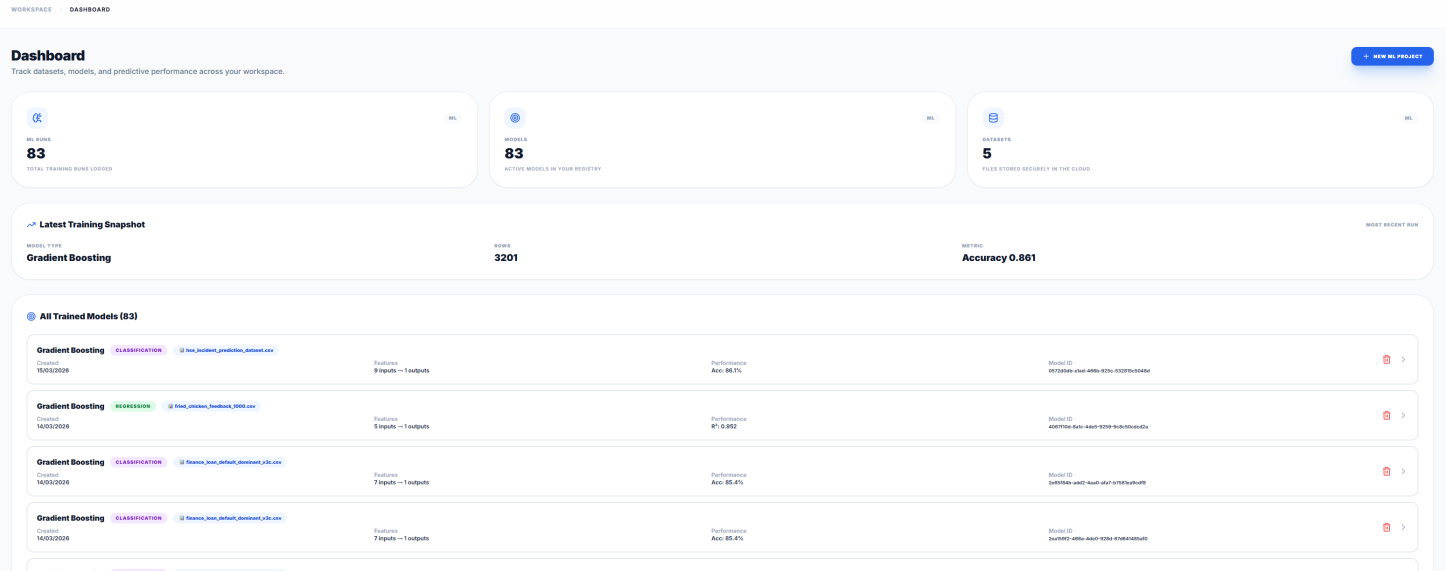
Keep runs, models, and files with their metrics in one dashboard. Load a saved model back into the Workbench to continue working.
Data Repository and team roles
Store, search, annotate, and download datasets, then open them in the Workbench. Invite teammates by email with owner, admin, editor, or viewer roles.
Organization access and data control
Every request is authenticated and scoped to your organization. Removing a member cuts their access to data and files immediately. Owners can export the organization's records or erase them.
Product descriptions, screenshots, workflows, and demonstrations are provided for evaluation purposes only. No rights are granted except as expressly agreed in writing by QDES.